After Hours
Weekdays 7-9 PM | For Adults & Older Teens | Drop Ins Available
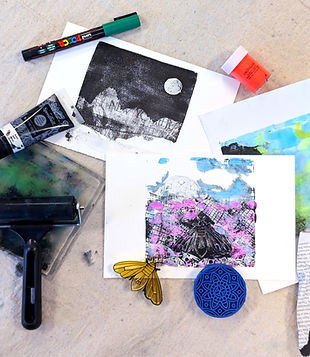
Discover relief printing in a fun, hands-on studio setting. This 10-week course covers traditional linocut and playful techniques like gelli printing. Beginners and experienced printmakers are welcome. You may drop in when space allows, but the full series offers the best progressive, skill-building experience. Sign up for drop ins here

Course Outline
Week 1: Relief Printing Basics
Explore printing with Legos, blocks, stamps, and the Prixel press. Learn positive vs. negative space, mirror image, and multiple impressions.
Week 2: Linocut Basics
Learn carving tools, safety, and make your first single-color linocut.
Week 3: Linocut: Design Development
Refine your carving and create a more detailed print.
Week 4: Two-Color Printing
Learn registration and how to align multiple colors.
Week 5: Intro to Gelli Printing
Experiment with texture, layering, and playful mark-making.
Week 6: Advanced Gelli Techniques
Use stencils, masks, and multi-layer designs.
Week 7: Mixed Media Printing
Combine methods like gelli backgrounds with linocut overprints.
Week 8: Reduction Printing
Create multi-color prints from one block through staged carving.
Week 9: Open Studio
Work on final prints using any techniques from the series.
Week 10: Open Studio + Portfolio Review
Finish projects, print final editions, and review your work.

Explore 3D printing, laser cutting, and digital design in this hands-on 10-week Fab Lab series. Each session covers a new tool or technique from beginner CAD to advanced machine settings—with supportive guidance and open lab time. Drop into individual sessions or take the full series for a stronger foundation and deeper connection to our maker community. Sign up for drop ins here

Course Outline
Week 1: Laser Cutter Basics
Safety, materials, and your first laser-cut project.
Week 2: Intro to Tinkercad
Beginner-friendly 3D modeling in the browser and your first 3D print model.
Week 3: Your First 3D Print
Slicing software, print settings, and troubleshooting.
Week 4: Creating vector designs for Laser Cutting and 3D printing
Create vector designs for engraving and cutting.
Week 5: Functional Enclosures in Onshape
Parametric CAD for boxes, cases, and fitted enclosures.
Week 6: Functional Enclosures in Onshape (continued)
Parametric CAD for boxes, cases, and fitted enclosures.
Week 7: Using the laser cutter and 3D printer to make stamps
Multi-pass engraving on different materials and multi color 3D printing.
Week 8: Work on your own project
Design and fabricate your own small scale project
Week 9: Work on your own project
Design and fabricate your own small scale project
Week 10: Showcase and Celebrate
Complete your project and show off your work!

Bring your knitting, crochet, embroidery, or fiber project and join our cozy weekly gathering. This is a free event and feel free to bring your snack or beverage to share. Select weeks feature optional paid technique workshops taught by our expert knitter/crocheter, Linnea Grimm. Join the lesson or just enjoy the creative community working on your own project.

Technique Spotlight Sessions:
Week 3 & 4 (Jan 21 and Jan 28): Filet Crochet
Week 6 & 7 (Feb 25 and Mar 4): Interlocking Crochet
Week 9 & 10 (Mar 18 and Mar 25) Crochet Flower and Garland Tutorial
All weeks: FREE Stitch and B*tch—bring your project and enjoy the company! Sign up for drop ins here

Teens and adults of all levels are welcome: from beginners learning washes, color mixing, and brush control to returning students refining technique and developing their personal style. Everyone gets step-by-step guidance, time to work at their own pace, and supportive feedback in a relaxed, welcoming studio. Sign up for drop ins here